


OurPact – Parental Control App
2.6533.00 Reviews
App Specs
- Version
- 9.18.5
- Updated On
- License
- Free
- Downloads
- 1,000,000+
- Developer
- Eturi Corp.
- Categories
- Lifestyle
- Platform
- Android
Screenshots

 Analysis by AppCompare
Choosing a parental-control app is less about finding a perfect digital rulebook and more about deciding which boundaries your family can maintain without turning every device into a daily argument. I see OurPact as a practical option for parents who want screen schedules and app limits in one place, with family location as an additional tool. It is a lifestyle app from Eturi Corp., and its current version is 9.17.0. The app is free to install, though it offers in-app purchases ranging from $1.99 to $99.99 per item.
What it is useful for day to day
The strongest reason to consider OurPact is that it brings several kinds of parental oversight together: screen-time allowances, app blocking, text blocking, and family location. That combination may suit a household that wants to set predictable device boundaries rather than rely on repeated verbal reminders. It is rated for Everyone, has passed one million installs, and has a 2.6 average from around two thousand ratings, so I would approach it as a tool worth assessing carefully—not assume every family will have the same experience.
In practical terms, I would start with one routine that is already causing friction. For example, a parent could set a regular device-free period around bedtime, then use app controls to make homework time less tempting. The useful idea is to agree on the routine first and use the app to support it. If the rules are a surprise, even a well-organized schedule can feel like a punishment and create more conflict than it prevents.
How to judge the setup before relying on it
Parental controls work across a parent’s device and a child’s device, so setup is not just a matter of installing one app and tapping a switch. I would set aside time to configure both sides, check that each child is attached to the right household profile, and confirm that the schedule behaves as expected before depending on it for school or bedtime. This is especially important when siblings have different routines: a schedule that works for one child may be too restrictive or too loose for another.
It is also sensible to explain what the controls do and why they are being used. A clear rule—such as apps being unavailable during homework—gives a child a reason they can understand, while a hidden restriction can undermine trust. I would treat location sharing similarly: useful for agreed family coordination, but not a substitute for talking about when and why everyone checks it.
Where it sits among alternatives
Compared with using the built-in screen-time tools on a phone, OurPact’s appeal is its family-focused mix of scheduling, blocking, and location features. Built-in controls may be enough if your only goal is to set basic device limits, and they can be a simpler starting point for a household that does not need a separate family-management app. OurPact makes more sense when you want those different controls gathered together and are prepared to manage an additional app.
It is not automatically the best choice for every parent. If you mainly need a location-sharing tool, a dedicated family locator may be a closer fit; if your main concern is managing one device’s daily use, a phone’s existing controls could be less complicated. Before paying for expanded features, I would first test whether the free experience covers the routines you actually need. The purchase range is broad, so check the in-app options and their terms before committing rather than assuming every feature is included at no cost.
Worth Reading Before You Choose

EA SPORTS FC Mobile 26 Is a Bigger Football Game, but It Takes Time

Flipboard Shows What News Apps Must Do Beyond the Feed

Switching to Android Auto Means Rethinking Your Driving Routine

Google Calendar Makes a Crowded Week Easier to Manage

Ludo King Makes the Most of the Minutes Between Plans

Baby Panda World Brings Quick Play to Modern Phones, but Its Game Library Feels Busy
Getting Started with OurPact
The first thing I noticed about OurPact is how easy it is to set up. You download it on your phone, create an account, and then install it on your kids' devices. The app guides you through the process step-by-step, so even if you're not tech-savvy, you won’t feel lost.
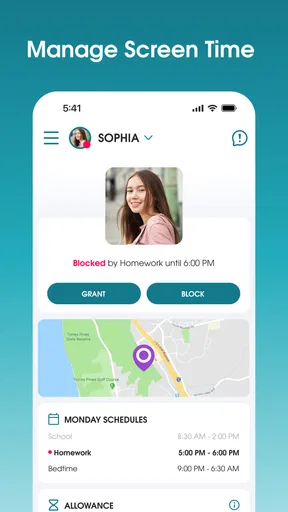
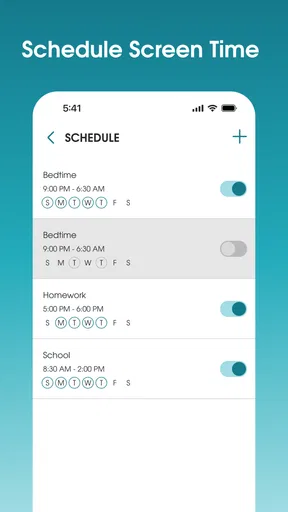
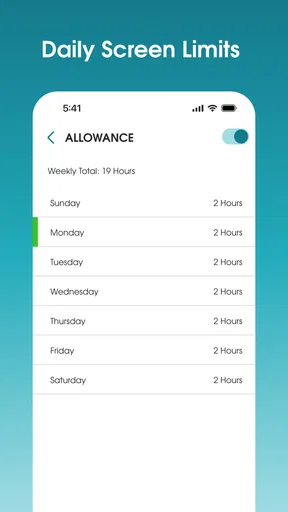
Once everything's set up, you can start managing your kids' screen time. The interface is pretty straightforward, with a clean design that doesn't overwhelm you with options. You can schedule when your kids can use their devices and even block specific apps when it's time for homework or bedtime.
Main Features
What I love about OurPact is its flexibility. You can create custom schedules for each of your kids, which is perfect if you have children of different ages. For example, my teenager gets a bit more screen time than my younger one, and that’s easy to manage with this app.
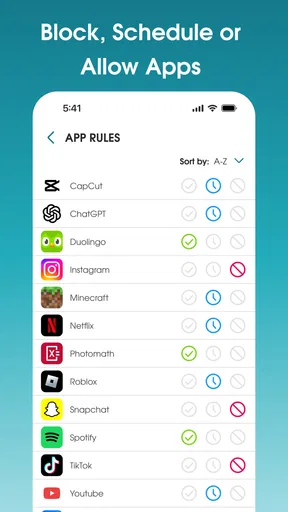
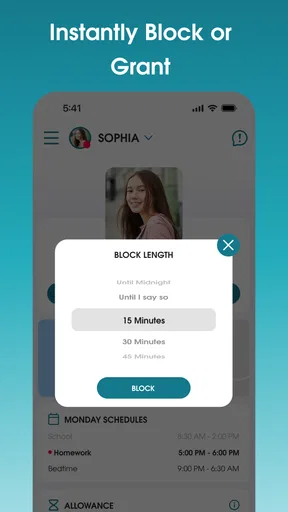
There's also a feature called "App Blocker," and it does exactly what it sounds like. You can block certain apps that you don’t want your kids to access. This is super useful for keeping them away from distractions during study time.
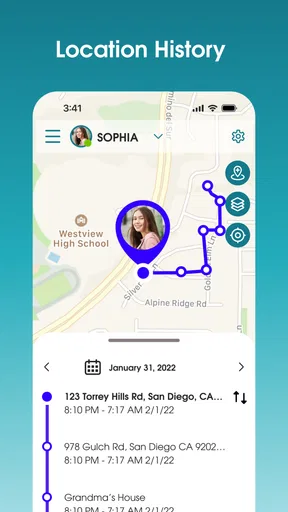
OurPact also offers a "Family Locator" feature. It's not just about controlling screen time; it gives peace of mind knowing where your family members are. Although I primarily use the app for screen time management, having this extra feature is a nice bonus.
Making schedules work in a real household
A schedule is most helpful when it matches the shape of the day, not when it tries to police every minute. I would begin with a few predictable blocks—such as schoolwork, meals, or bedtime—and leave room for exceptions like a late activity or a family trip. This reduces the temptation to keep changing settings in the heat of an argument. It also gives children a routine they can anticipate instead of a stream of sudden lockouts.
For a family with children of different ages, separate schedules are more than a convenience: they let a parent set boundaries that reflect different responsibilities. A younger child might need a firm evening cutoff, while a teenager may need access later to finish schoolwork. I would still review those rules together from time to time. The app can enforce a plan, but it cannot decide whether the plan remains fair as a child’s needs change.
Using controls without over-controlling
App blocking is most useful when it targets a specific distraction at a specific time. Blocking every entertainment app all day can remove the very flexibility that makes a schedule workable, while blocking a small set during study periods keeps the rule easier to explain. Before applying a block, I would check that the child still has access to whatever they need for school or family communication. A control that interrupts a legitimate task can quickly lose the family’s confidence.
Text blocking also deserves a deliberate approach. It can be relevant for parents who want an additional boundary around messaging, but a blanket rule may interfere with ordinary coordination. I would decide what problem the restriction is intended to solve, discuss it in age-appropriate terms, and revisit it as circumstances change. The point is not to use every available control simply because it exists; it is to choose the smallest set that addresses a real concern.
Real-World Use
Using OurPact has genuinely changed how we handle screen time in our house. Before, it was a constant battle trying to pry the devices away, but with the schedules and app blocking, it’s much smoother. My kids know when their screen time ends, and they’ve gotten used to the boundaries.
One thing I’ve noticed is that the app performs consistently well. There’s no lag or glitches, which is crucial because no one wants to deal with tech issues when managing kids' devices. The app is reliable, and that's a big win in my book.
What can still feel like friction
Even with a clear routine, parents should expect to spend some attention on setup and ongoing adjustments. A schedule that does not match a child’s real week will need revisiting, and managing multiple devices can require more care than setting limits on just one phone. I would not make the app the only way a family communicates a rule: explain the boundary, then use the control as backup. That makes an unexpected restriction easier to troubleshoot without treating it as a personal dispute.
There is also a trade-off between convenience and oversight. Combining controls in one family app can simplify management, but it means parents are relying on an additional service rather than only the tools already on a device. Families who prefer fewer accounts and settings may find the built-in option easier, even if it does not bring together the same mix of controls. The right choice depends on whether the extra coordination is genuinely useful in your home.
Additional Insights
OurPact offers a premium version with more features, such as unlimited device management and location tracking. While I started with the free version, I found the premium features to be worth the investment for my family. The peace of mind and ease of management it provides are definitely valuable.
Another aspect that stands out is the customer support. Whenever I had questions or needed help, the team was responsive and helpful. It’s nice to know that there's solid support backing up the app.
Because paid options can change what a household can manage, I would check the exact plan details inside the app before building a routine around a feature. That is particularly important if you are comparing it with free device-level controls: make the comparison using the specific tools your family needs, not the most expansive plan. If a feature is essential, confirm its availability and test the workflow before counting on it every day.
Keeping expectations realistic
A locator can be reassuring when family members use it for practical coordination, such as checking that someone has arrived, but it does not replace direct contact or judgment. Likewise, a blocked app can reduce an easy distraction without guaranteeing that a child will focus on homework. I see these tools as aids for a household agreement, not a way to outsource parenting or eliminate every disagreement about screens.
That distinction also helps answer whether the app is suitable for a younger child or a teenager. The control options may help parents establish structure, but the conversation around them should change with the child’s age and independence. A younger child may benefit from straightforward routines, while an older one is more likely to need a say in how limits are set and reviewed. If a family is not ready to discuss those boundaries, installing a control app alone is unlikely to solve the underlying tension.
Final Thoughts
Overall, OurPact has been a game-changer for our family. It simplifies the process of managing screen time and offers peace of mind with its location features. The app is user-friendly, reliable, and the customer support is excellent. If you’re looking for a way to balance your kids' digital lives with real-world responsibilities, I’d recommend giving OurPact a try. It's like having a digital assistant that's always ready to help out.
Who should try it—and what to watch
I would recommend giving it a careful trial if your household needs more than a basic bedtime timer: schedules, app restrictions, text blocking, and location tools can be useful when they solve distinct problems for the same family. A realistic weekday test might be to set a study period, block only the apps that regularly derail it, and use the agreed evening schedule afterward. Then check whether the arrangement reduces reminders without creating new complaints about missed access or unclear rules.
I would skip it, or start with built-in controls instead, if you want a very simple limit on one device, do not want to manage another account, or are not comfortable making location and blocking rules part of family life. Its average rating is modest, so I would pay attention to your own setup experience rather than assume it will feel effortless for everyone. The app first appeared on July 21, 2017, and its current version is 9.17.0; those facts show a product with a long presence and a current release, but they do not prove that every family’s particular issue has been addressed.
What I would watch next is whether the controls remain easy to adapt as children gain independence and routines change. Before relying on any restriction, check it on the child’s device, make sure the family understands the rule, and keep a simple backup plan for an urgent need. For me, OurPact is most convincing when it supports a conversation and a consistent routine; it is less convincing as a substitute for either.
Pros
- Easy setup and user-friendly interface.
- Customizable schedules for device usage.
- Real-time location tracking feature.
- Seamless cross-platform compatibility.
- Robust web filtering capabilities.
Cons
- Limited features in free version.
- Occasional app crashes reported.
- Requires stable internet connection.
- Some features need manual updates.
- Not fully compatible with all devices.
FAQs for OurPact – Parental Control App
What features does OurPact offer for parental control?
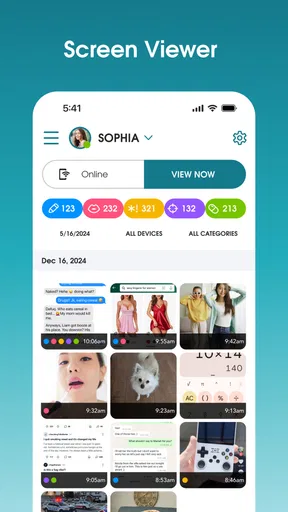
OurPact provides a comprehensive suite of parental control features. These include app blocking, screen time management, and location tracking. Parents can schedule device usage, block specific apps, and set geofences for safe zones. The app also allows for internet filtering and provides detailed reports on device activity, ensuring parents can monitor and manage their child’s digital life effectively.
Is OurPact compatible with both Android and iOS devices?
Yes, OurPact is designed to work seamlessly across both Android and iOS platforms. However, some features may vary slightly between operating systems due to inherent differences in Android and iOS capabilities. It's advisable to check the specific feature availability for your device type to ensure it meets your needs before downloading.
How secure is the data managed by OurPact?
OurPact prioritizes user privacy and data security by employing encryption protocols to safeguard personal information. The app ensures that data such as location and usage reports are stored securely. Parents can rest assured that their family’s data is protected from unauthorized access, aligning with industry standards for security.
What age group is OurPact most suitable for?
OurPact is most effective for families with children and teens aged 5-17. The app’s flexible controls allow it to be tailored to the varying needs of different age groups, from setting basic boundaries for younger children to more detailed monitoring for teenagers, making it a versatile tool for managing digital habits.
Are there any costs associated with using OurPact?
OurPact offers both free and premium plans. The free version includes basic features like app blocking and screen time schedules. For advanced features such as location tracking and unlimited device management, there are subscription options available. Pricing is structured to accommodate different family needs, providing flexibility and enhanced control.


